 NeXTDock
Free and open source. Version 0.3.0 is out now.
NeXTDock: a NeXTSTEP-style dock for modern macOS
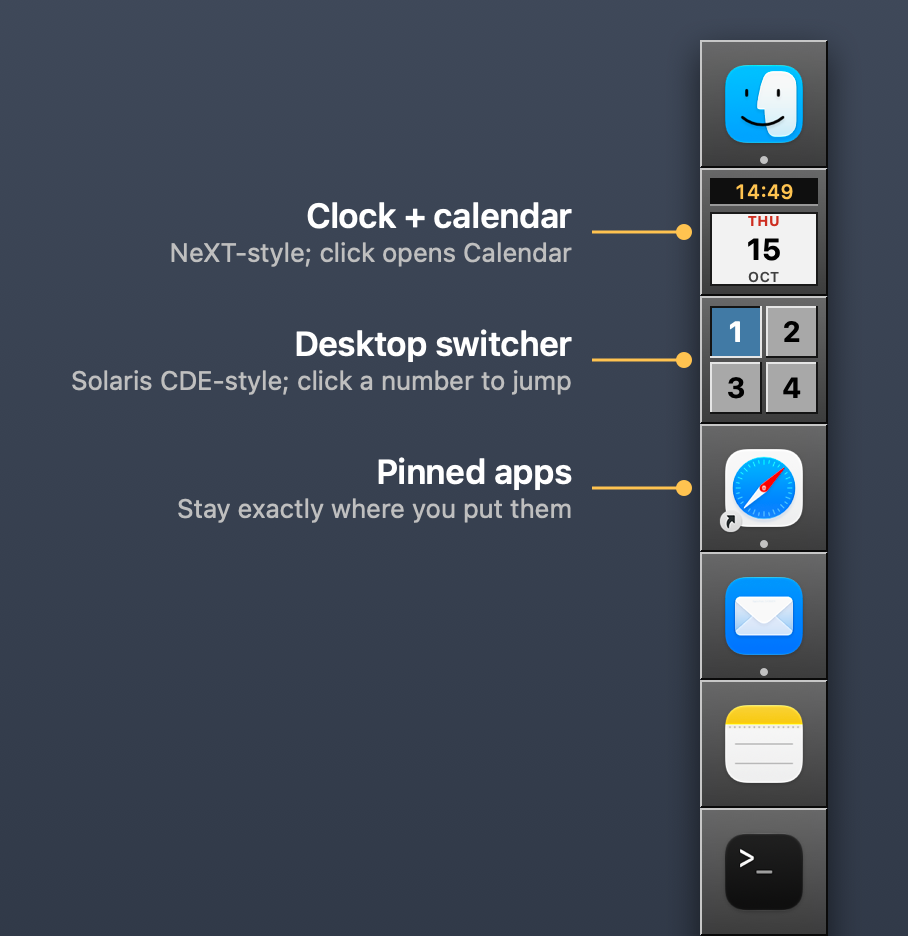
A fixed column of beveled tiles on the edge of your screen that stays exactly the way you set it up. Pin apps, folders, scripts and Shortcuts. Running apps get their own section. A NeXT-style clock and a one-click desktop switcher are built in.
macOS 13 or later. Apple Silicon and Intel. Signed with an Apple Developer ID and notarized by Apple.
Like it? Tips are welcome, never required.
Why you might want a macOS Dock replacement
The Dock has barely changed in twenty years, and it still gets in the way of people who want their Mac set up a certain way.
Pinned and running apps are mixed together.
Open an app and the Dock shifts. Your muscle memory for where things are stops working.
Background apps won't go away.
Helper apps and menu-bar utilities show up in the Dock whether you want them there or not.
Scripts and Shortcuts have no home.
Pinning a folder is awkward, and there's no good way to keep a shell script or a Shortcut one click away.
Everything you can put in NeXTDock
Each tile does one job and stays where you put it. Nothing gets added, removed or rearranged on its own.
Apps
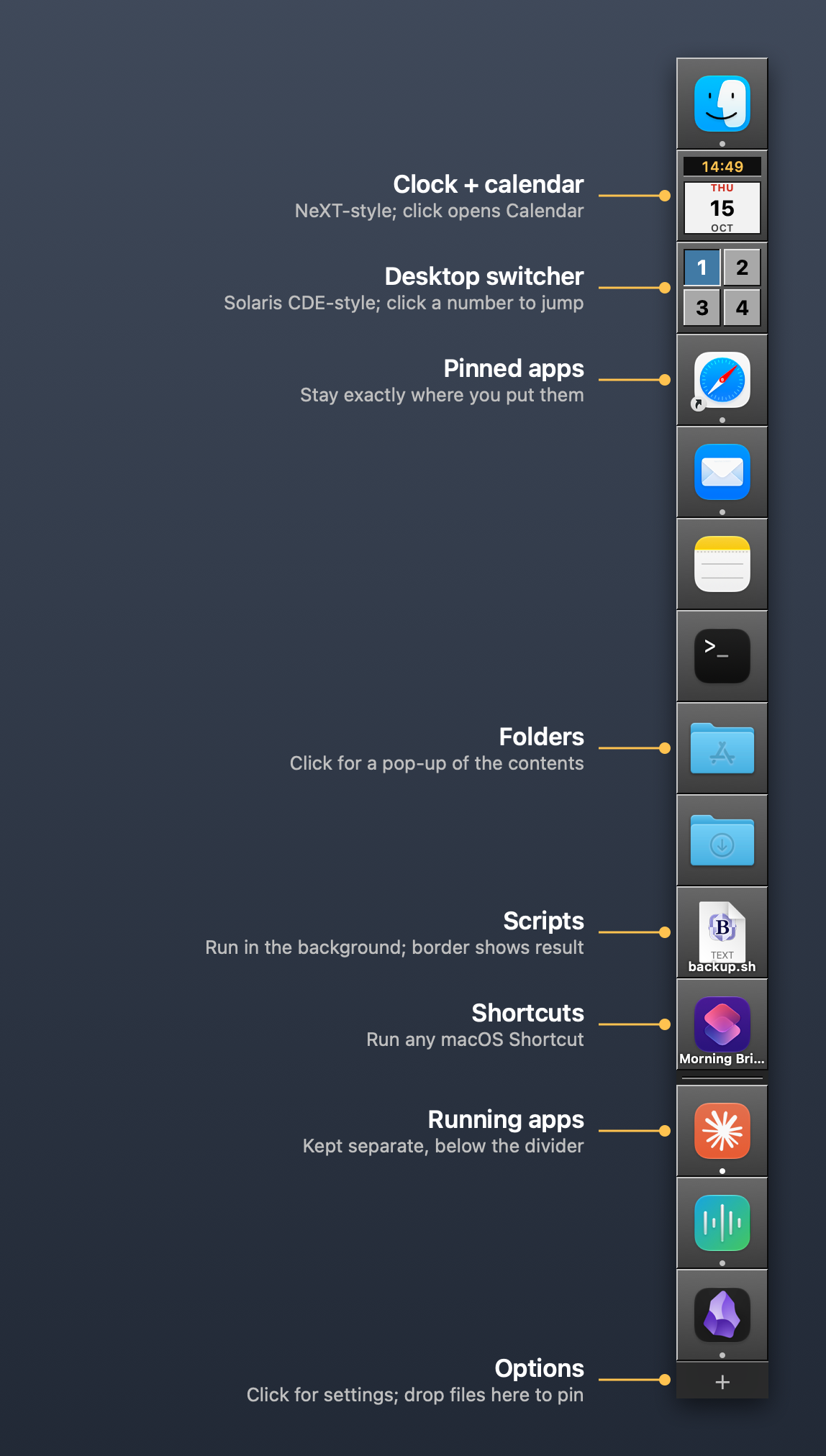
Click to launch or bring an app to the front. Drop a document on an app tile to open it with that app.
Folders
Click a folder for a pop-up menu of what's inside. Downloads is sorted newest first.
Scripts
Shell, Python and AppleScript files run in the background. The tile border turns yellow while it runs, then green for success or red for failure. Drop files on a script to pass them in. Output is saved to a log.
Shortcuts
Run any macOS Shortcut from the dock. Drop files on the tile to use them as the Shortcut's input.
Clock and calendar
A live NeXT-style clock with a calendar page underneath. It follows your 12- or 24-hour setting. Click it to open Calendar.
Desktop switcher
Solaris CDE-style buttons, one per desktop, with the current one pressed in. Click a number to jump straight to that desktop.
A look at the whole dock
Pinned items sit on top. Running apps sit below a divider, in the order you opened them.
Pinned items never move.
Dragging a tile out of the dock does nothing, so you can't lose one by accident. Lock the dock to stop changes altogether.
Running apps are kept separate.
They get their own section below a divider. Hide any app from that section with "Never Show in Dock."
Starts from your current layout.
On first launch it copies what's pinned in Apple's Dock, so you begin with something familiar.
Works alongside Apple's Dock.
It doesn't replace Apple's Dock (macOS protects it). It can push Apple's Dock out of sight while Mission Control and Spaces keep working.
Options are one click away.
The + tile at the bottom sets the screen edge, tile size, lock, launch at login, NeXT-style double-click to launch, and the NeXT-style running indicator.
Install it in under a minute
No account, no sign-up, no subscription.
Download the app
- Download the latest NeXTDock .dmg file from the GitHub Releases page.
- Open it and drag NeXTDock into your Applications folder.
- Open NeXTDock from Applications.
- To start it automatically, click the + tile at the bottom of the dock and choose Launch at Login.
The only permission it asks for is Accessibility, and only if you use the desktop switcher. It switches desktops by pressing macOS's own "Switch to Desktop" shortcuts (Control-1 to Control-9) and turns those shortcuts on for you the first time.
Or build it from source
git clone https://github.com/kghaynes/nextdock.git
cd nextdock
./build.sh --install
Needs Xcode or the Command Line Tools (xcode-select --install). Settings are plain JSON in ~/Library/Application Support/NeXTDock/config.json, safe to edit by hand.
Support NeXTDock
NeXTDock is free and open source. There are no ads, no paid tier, and nothing leaves your Mac. It's built and maintained by one person on his own time. If it made your Mac a little less maddening, you can say thanks here.
GitHub Sponsors
One-time or monthly. GitHub charges no fees, so all of it goes to the project.
Sponsor on GitHubOther ways to help (free)
- Star the repo on GitHub
- Report a bug or suggest a feature
- Tell a fellow NeXT or Solaris veteran about it
Tips are completely optional and are not tax-deductible. Everything in NeXTDock works the same whether you tip or not.
Common questions
Is NeXTDock free?
Yes. It's free and open source under the MIT license. There's no paid version and no trial. Tips through GitHub Sponsors or Ko-fi are optional.
Does it replace the macOS Dock?
It runs alongside it. Apple's Dock is a protected part of macOS and can't be removed, but NeXTDock can push it out of sight while Mission Control and Spaces keep working. You can bring Apple's Dock back from the + menu at any time.
Which Macs does it run on?
Any Mac on macOS 13 (Ventura) or later, Apple Silicon or Intel. The download is a single universal app, signed with an Apple Developer ID and notarized by Apple.
Can I pin a shell script or a Shortcut?
Yes. Shell, Python and AppleScript files run in the background, and the tile border shows yellow while running, then green or red for the result. .command files open in Terminal. Shortcuts run directly. You can drop files on either to pass them in.
What permissions does it need?
Only Accessibility, and only if you use the desktop switcher. Everything else works without any special permission.
Does it collect any data?
No. There's no account, no analytics and no network calls. Your layout is stored in a JSON file on your own Mac.
What doesn't it do yet?
It doesn't show unread-count badges yet. The desktop switcher follows the desktops on your main display only. Dropping a window on a desktop button to move it isn't possible without turning off System Integrity Protection, so it isn't offered.
How do I uninstall it?
Quit NeXTDock, restore Apple's Dock from the + menu if you hid it, and drag the app to the Trash. The README lists the two folders to delete if you want to remove its settings and logs too.
Is it affiliated with Apple or NeXT?
No. NeXTDock is an independent project by Kenneth Haynes and CyberCloudAI.tech. NeXT, NeXTSTEP and Solaris are named only to describe the look it is inspired by.
Get NeXTDock
Download the app, drag it to Applications, and your dock is set up the way you want it in a minute.
Report a bug or request a feature Read the full README GitHub Sponsors Ko-fi
NeXTDock is built by CyberCloudAI Consulting, a service-disabled veteran-owned small business in Melbourne, Florida. We also help small defense contractors with CMMC, cloud and AI. See our services.